Security researchers have uncovered a critical vulnerability in Windows 11 that allowed attackers to escalate privileges from a standard user to system-level administrator in just 300 milliseconds.
The flaw, tracked as CVE-2025-24076, has been patched by Microsoft but represents a significant security risk for unpatched systems.
The vulnerability leveraged a Dynamic-link Library (DLL) hijacking technique within Windows 11’s “Mobile devices” feature, enabling attackers to execute arbitrary code with system privileges.
The security flaw was initially detected during a routine penetration testing assignment where researchers were tasked with finding “something interesting” on a customer’s laptop.
Using the automated scanning tool PrivescCheck, they identified suspicious file permissions related to a COM server module.
Further investigation revealed that the issue was connected to Windows 11’s “Mobile devices” feature, which allows users to link their phones with their computers to send messages, make calls, and use their phone’s camera as a webcam.
The vulnerability stemmed from a design flaw where a DLL file located in a user-modifiable directory (C:\ProgramData\CrossDevice\CrossDevice.Streaming.Source.dll) was loaded first by a regular user process and subsequently by a high-privileged system process.

Although the DLL was signed by Microsoft, the processes failed to verify the signature before loading it, creating an opportunity for attackers to replace the legitimate file with a malicious one.
The exploitation presented a significant challenge due to the extremely narrow time window of just 300 milliseconds between the operations.
Initially, researchers attempted to manually replace the DLL file, which occasionally worked on slower virtual machines but wasn’t reliable for consistent exploitation.
To overcome this limitation, the researchers developed sophisticated techniques leveraging Opportunistic Locks to halt program execution until the DLL was released.
Upon examining the Close ② operation in more detail, we can determine why the file was opened in the first place. Specifically, we see that GetFileVersionInfoExW ③ was called to retrieve information about the file.
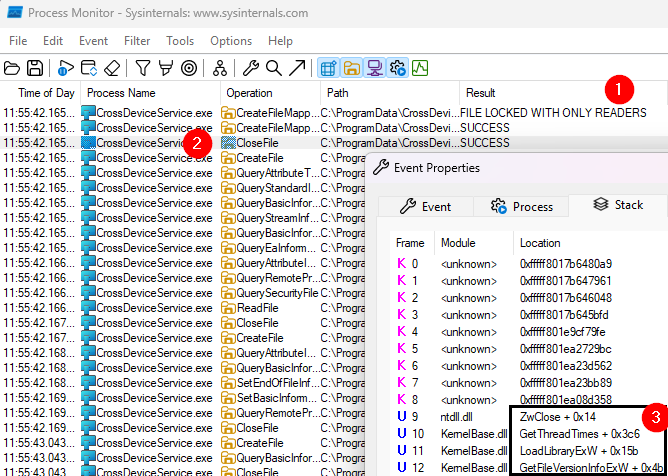
The idea now is to intercept the GetFileVersionInfoExW function, wait until the file is closed, and then overwrite it with our malicious version.
They also intercepted Windows API calls using Microsoft’s Detours library to monitor when the file was closed, allowing them to precisely time the replacement of the legitimate DLL with their malicious version.
The attack was further refined by creating a proxy DLL that maintained the expected functionality while executing unauthorized commands.
This approach allowed the malicious code to run without crashing the system processes, making the exploit both reliable and stealthy.
The researchers demonstrated how their malicious DLL could create a file in the C: directory, an action that only administrative users should be able to perform.
Microsoft addressed both CVE-2025-24076 and the related CVE-2025-24994 vulnerability in a recent security update released on March 11, 2025.
The fix came after a responsible disclosure process that began in September 2024, with Microsoft confirming the issues one day after notification.
Security experts recommend immediate application of Windows updates to protect systems from exploitation.
Additionally, organizations are advised to implement Endpoint Detection and Response (EDR) solutions to identify unusual behaviors that could indicate exploitation of similar vulnerabilities before patches are available.
The researchers who discovered the vulnerabilities emphasized that despite the sophisticated nature of such exploits, proper security measures and timely updates remain effective defenses against privilege escalation attempts on Windows systems.

Powered by